Your business, one message away — on every screen.
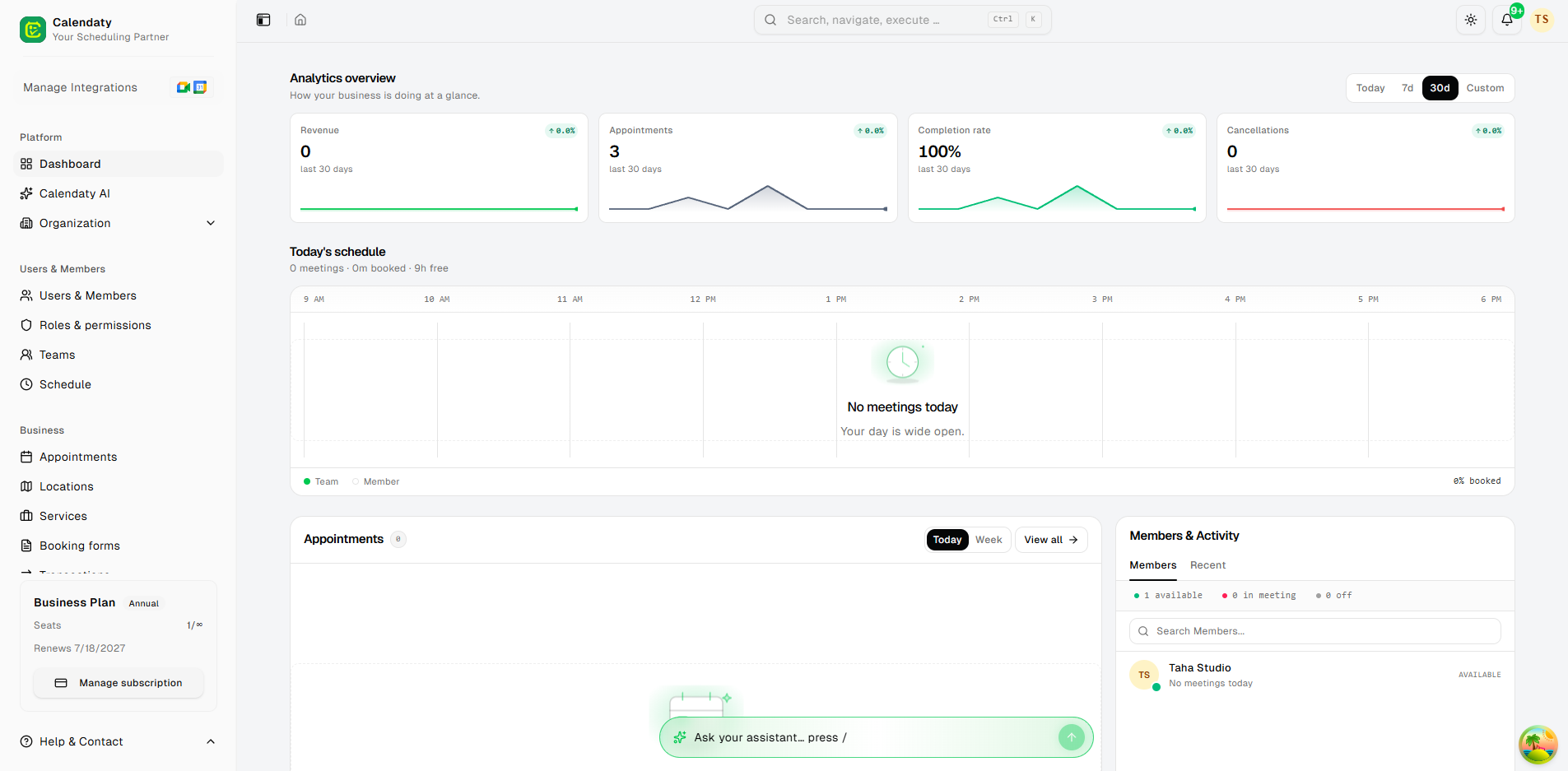
The Copilot lives in a glowing bar at the bottom of every dashboard page, one keystroke away. Ask anything in plain language — and it doesn't just answer, it acts: it pulls your numbers, opens the right screen, changes settings and drafts your automations. Nothing to set up.
- Press / on any page
- Also in ⌘K search
- On Slack and Telegram
Bookings 142
Revenue AED 21.4k
On it — here are your payment settings.
Opening Payment Settings
A chatbot tells you where to go. A copilot takes you there.
Ask the Copilot for something and it doesn't hand you a help-doc link — it does the thing, right from the chat box.
A chatbot
- Replies with text
- Points you toward a settings page
- Explains how to do it yourself
Your Copilot
- Opens the exact screen for you
- Switches your theme
- Refreshes your data
- Drafts the automation
Just say it
No menus, no filters, no reports to build. Type a sentence and the Copilot answers — and runs the next step for you.
- How did we do this week? A tidy performance summary
- Any bookings today? Today at a glance — 9 booked, Sara next at 2:30pm with Lina
- Who's my top customer? Insight, no spreadsheet — Sara A., 14 visits this year
- Take me to my payment settings. The screen opens
- Switch to dark mode. The theme flips
- Draft a follow-up automation for after every appointment. A workflow gets started, waiting for your review
- Add a new customer. The form opens
It only ever shows you the actions you have permission to use.
Your numbers, on demand
Ask the questions you'd normally dig through reports for — and get a straight answer in seconds.
- “How did we do this week?” — performance at a glance
- “Any bookings today?” — your day, summarized
- “Who's my top customer?” — insight without the spreadsheet
- Revenue, bookings, customers — just ask
/ How did we do this week?
This week
Bookings 142
Revenue AED 21,400
+18% on last week
It knows what you're looking at
The Copilot reads the page you're on before it answers, so you can ask about “this” without explaining what “this” is. Replies are about your current screen and your data — never generic help-doc answers.
- Context from your current page
- Ask about “this” — no re-explaining
- Answers grounded in your data
- Your open chat follows you as you move between pages
Viewing Sara A. · customer profile
Sara A.
/ When was her last appointment?
Sara last came in on 12 June for a cut and blow-dry with Lina.
The same brain powers your search
Hit ⌘KCtrl + K — type what you want in plain words, then press Ask AI. It answers and surfaces the exact next actions, ready to run in one click.
- Plain-language command bar
- Answers and runnable actions, side by side
- One click to run the next step
- Only ever the actions you're allowed to use
⌘K Invite a stylist to the team Ask AI
Actions · one click to run
Invite a teammate Run
Create an appointment Run
Open Team settings Run
Built to stay out of your way
Reach it wherever you work
Open it inside the dashboard, or chat with it from Slack and Telegram — check on the business without even logging in.
Keeps your history
Every conversation is saved per workspace. Reopen a past chat, start a new one, or clear them anytime — and your open chat follows you between pages.
Only what you're allowed
It can only run the actions your role permits, so nothing happens that shouldn't.
Why it helps
- Skip the clicking
- No learning curve
- Your numbers, on demand
- Run it from anywhere
- One keystroke, every page
Nothing to set up
Connect your calendar, share your link, and let Calendaty turn questions into booked, paid appointments — starting today.
Open any page, press the slash key, and ask your first question · The Copilot is available on paid plans
Frequently asked questions
Will it change things without asking?
No. It only runs an action when you ask for it, it can only do what your role permits, and anything it drafts — an automation, for instance — waits for your review before it goes live.
What can it actually do beyond answering?
It opens the exact screen you need, changes settings, refreshes your data, drafts automations, and runs one-click actions like creating an appointment or inviting a teammate — all from the chat box.
Where can I use it — dashboard only?
It lives in a bar at the bottom of every dashboard page and inside the command palette. You can also chat with it from Slack and Telegram to check on the business without logging in.
Does it see my data, and is that private?
It reads the page you're on and your workspace data so its answers are grounded, never generic help-doc replies. Conversations are saved per workspace, and you can clear them anytime.
Which plans include the Copilot?
The Calendaty AI Copilot is available on our paid plans. Start free to explore the platform and turn the Copilot on whenever you're ready.